| Camera coverage and blind spots |
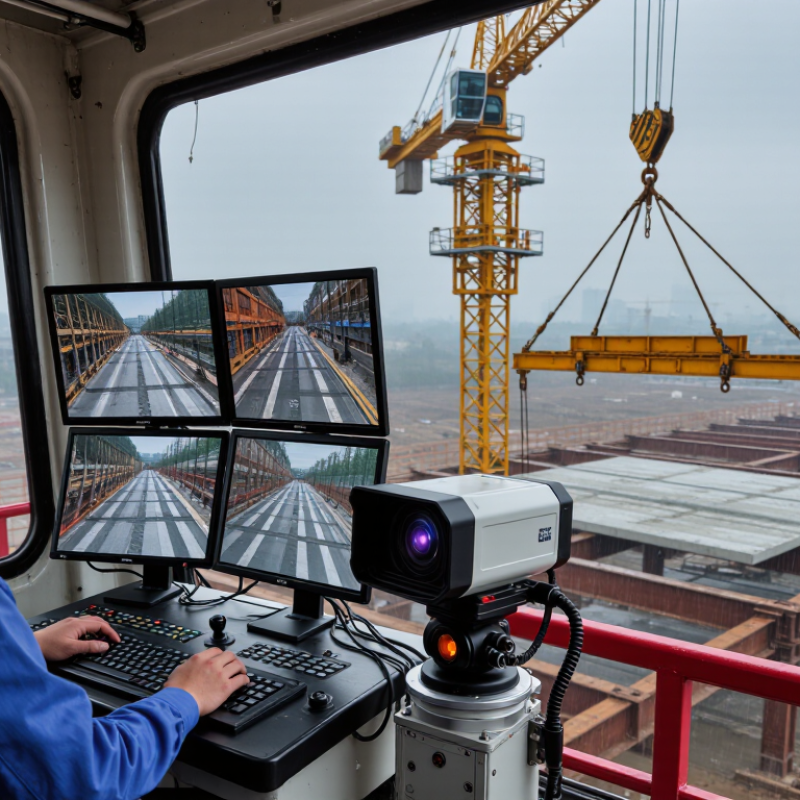
Map the operator’s view of the hook, load, landing area, travel path, and nearby hazards. Assess each camera position through the full range of crane movement. |
Conduct a site-specific visibility test with representative loads and operating positions. Confirm that camera views supplement—not obstruct—the operator’s required view. |
A camera can improve visibility but may still leave blind zones because of load shape, glare, structure, or changing crane geometry. |
| Image clarity and low-light performance |
Check resolution, field of view, focus, backlight handling, night performance, and visibility in dust, rain, or changing light. |
Test with the actual monitor, camera mounting distance, work lighting, and typical load. Ensure the hook and relevant load edges are distinguishable. |
Specifications alone do not establish whether an operator can reliably interpret the image in the work environment. |
| Live video delay and display |
Evaluate end-to-end video delay, image stability, screen readability, and whether the display remains visible without distracting the operator. |
Measure or observe delay during actual crane motions; confirm the view updates smoothly enough for the intended task and that the monitor can be positioned securely. |
Excessive delay or a poorly placed screen can reduce the usefulness of a live view. |
| Safety alerts and system status |
Check for clear fault indications, camera-disconnected warnings, loss-of-signal alerts, and a defined response when the image is unavailable. |
Simulate loss of power or signal during commissioning. Document the operator’s fallback procedure and who is responsible for restoring the system. |
An operator should be able to recognize when a view cannot be relied upon and follow an established safe procedure. |
| Environmental protection |
Review the enclosure’s IP rating under IEC 60529, operating temperature range, resistance to water and dust, and suitability for outdoor exposure. |
Match the documented rating and temperature range to the site conditions. Check that connectors, cable entries, and mounting hardware are protected as well as the camera housing. |
A camera’s durability depends on the complete installation, not only the enclosure rating of the camera body. |
| Shock, vibration, and mounting |
Ask for documented shock and vibration ratings, mounting recommendations, cable strain relief, and evidence that the installation suits the crane type. |
Inspect mounting points and cabling; verify that the image remains stable during normal crane motions and that components cannot loosen or enter moving parts. |
Crane movement and vibration can affect image stability, connections, and equipment service life. |
| Electrical compatibility |
Confirm supply voltage, current draw, grounding, circuit protection, cable routing, and compatibility with the crane’s electrical system. |
Have a qualified person review the wiring diagram and installation. Protect cables from abrasion, heat, crushing, and interference with crane operation. |
Incorrect integration can cause equipment faults or introduce electrical and mechanical hazards. |
| Regulatory and standards review |
Identify the jurisdiction, crane type, workplace rules, and applicable regulations or standards. In the United States, review relevant OSHA crane requirements, including 29 CFR 1926 Subpart CC for construction cranes or 29 CFR 1910.179 where applicable to overhead and gantry cranes. |
Confirm requirements with the responsible safety professional or authority. Do not assume that a camera satisfies or replaces a required operational aid, inspection, or safe-work procedure. |
Requirements vary by jurisdiction, crane type, and application; camera systems are not a universal substitute for regulatory safeguards. |
| Recording, privacy, and data handling |
Decide whether recording is needed, who may access footage, how long it is retained, and how worker privacy and local data-protection rules will be addressed. |
Set a written access and retention policy before enabling recording; verify storage capacity, time synchronization, and secure access where applicable. |
Recording needs and privacy obligations depend on the workplace and applicable law. |
| Maintenance and commissioning |
Review cleaning access, lens protection, replacement parts, inspection intervals, and the availability of installation and maintenance documentation. |
Record camera positions and settings, test the system after installation and repairs, and include camera condition and image quality in routine checks. |
Dirt, impact, misalignment, or damaged wiring can make a previously useful camera view unreliable. |