Choosing a 7 Inch Waterproof Monitor is not simply a screen-size decision. It affects visibility, mounting, wiring, maintenance, and operator safety. MarketsandMarkets’ rugged display research identifies sealed construction, sunlight readability, touch performance, and shock resistance as major buying factors. Grand View Research also reports continuing demand for industrial displays in transportation, manufacturing, and outdoor equipment. However, these reports often combine several display sizes and applications. Their figures should not be treated as exact forecasts for seven-inch models.
Real-world selection starts with the environment. IEC 60529 defines IP protection levels, but an IP67 rating does not automatically prove chemical resistance, impact protection, or long-term saltwater durability. A dockside operator may need a sealed connector, optical bonding, and a brightness level above 700 nits. A warehouse technician may value glove-friendly touch more than extreme brightness. Check the details. Marketing language can be vague.
Human-factors expert Don Norman wrote, “Design is really an act of communication.” That principle fits this product closely. A monitor should communicate clearly through rain, glare, vibration, and hurried hands. Look for a wide viewing angle, physical control buttons, anti-fog performance, and a mounting system that does not loosen after repeated movement. Experience shows that a perfect specification sheet can still fail during installation. Cable routing may be awkward. Touch sensitivity may drop behind gloves. This is where careful testing matters. The best 7 Inch Waterproof Monitor is not the most expensive model; it is the one that remains readable, controllable, and dependable in its actual working conditions.
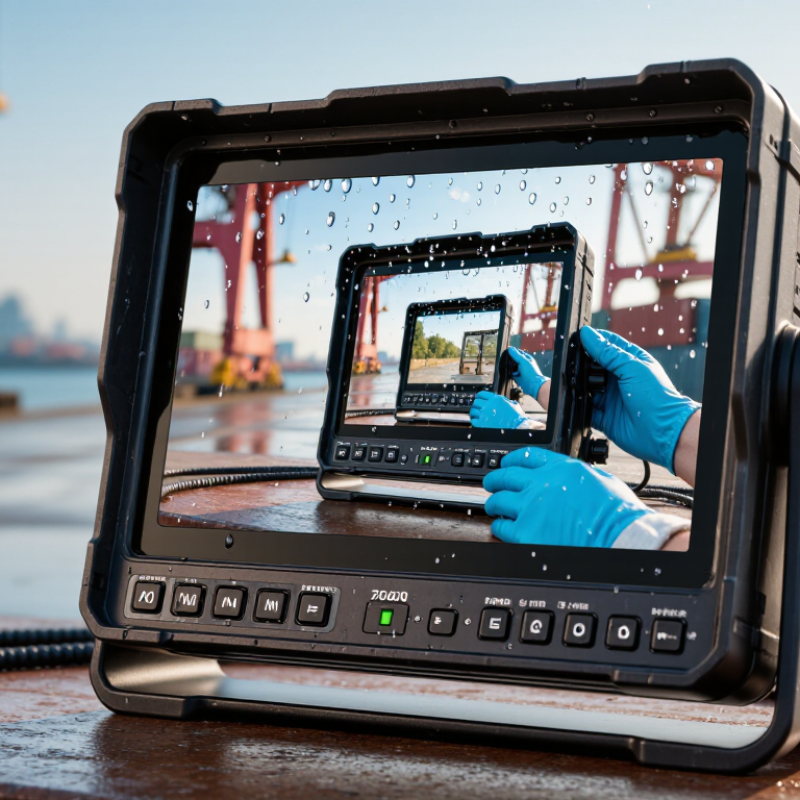
A 7-inch waterproof monitor must match the environment, not just the vehicle or machine.
In field installations, I have learned that enclosure protection matters most. Look for a tested IP rating under IEC 60529, such as IP65 or IP67. IP65 resists water jets, while IP67 covers temporary immersion.
However, an IP rating does not guarantee protection after damaged seals or poor installation. Check the test conditions carefully.
Screen readability is equally important.
A bright display, anti-glare surface, and wide viewing angle help in direct sunlight. Around 800 to 1,000 nits can improve outdoor visibility, but higher brightness may increase heat and power use.
Capacitive touch feels smooth, yet physical buttons work better with wet gloves. Some screens support glove or wet-touch operation, though performance can vary.
Inspect the connectors before deciding.
Waterproof cable glands, sealed ports, and protective covers reduce moisture problems. Confirm the operating temperature range for cold mornings and hot dashboards. Vibration-resistant mounting is also essential on boats, utility vehicles, and industrial equipment.
I once focused too heavily on image quality and overlooked cable placement. Condensation later appeared near the connector. That mistake changed my checklist.
Check input compatibility, mounting depth, power requirements, and warranty terms before installation. A short test in real weather can reveal more than a polished specification sheet.
How to Choose a 7 Inch Waterproof Monitor?
Choosing the Right Waterproof Rating for Your Usage Environment
A waterproof rating should match the actual conditions around your 7 inch monitor. IP65 protects against dust and water jets from any direction. It suits covered outdoor equipment, workshops, and vehicle dashboards exposed to rain. IP66 handles stronger water jets, but it still does not permit immersion.
For boat controls, agricultural machinery, or equipment near flooded floors, consider IP67. This rating usually supports temporary immersion up to one meter for 30 minutes. IP68 may offer deeper or longer immersion, but the manufacturer must define those limits. Never assume every IP68 monitor has identical protection.
Check the connectors, cable glands, buttons, and mounting seal. A sealed front panel cannot protect loose cables behind it. I have seen water enter through a poorly tightened connector, not the display surface. Salt spray, cleaning chemicals, and condensation create additional risks. The IP test uses fresh water under controlled conditions. Your environment may be harsher.
Leave room for drainage.
Choose a rating with practical margin. If the monitor faces direct spray every day, IP66 may be wiser than IP65. For occasional splashes, IP65 could be sufficient and more economical. Still, ratings can be misunderstood. Verify test conditions, immersion limits, operating temperature, and installation instructions before purchase.
| Usage Environment | Typical Exposure | Minimum Suggested IP Rating | What the Rating Protects Against | Recommended Monitor Requirements | Important Selection Notes |
|---|---|---|---|---|---|
| Indoor control cabinet or office workstation | Dust, accidental contact, and occasional dry cleaning | IP40–IP54 | IP40 prevents objects larger than 1 mm from entering. IP54 provides limited dust ingress protection and protection from water splashes. | Standard 7-inch display, protected ventilation openings, and sealed cable routing where necessary. | Do not select a high waterproof rating solely for appearance; excessive sealing may affect heat dissipation if the enclosure is not properly designed. |
| Indoor factory floor | Industrial dust, vibration, oil mist, and occasional splash water | IP54–IP65 | IP65 is dust-tight and protected against water jets from any direction. | Rugged housing, vibration-resistant mounting, sealed front bezel, and locking connectors. | Check the protection level of the complete installed system, including cable glands, connectors, buttons, and mounting points. |
| Food-processing or washdown area | Frequent water spray, detergents, and routine surface cleaning | IP65–IP66 | IP66 is dust-tight and protected against powerful water jets. | Sealed front surface, smooth cleanable housing, corrosion-resistant fasteners, and protected cable connections. | IP rating does not confirm chemical resistance. Verify compatibility with detergents, disinfectants, oils, and the enclosure material. |
| Outdoor vehicle, marine deck, or exposed equipment | Rain, windblown dust, spray, condensation, and temperature changes | IP65–IP66 | Protection against dust and water jets; IP66 offers stronger water-jet protection than IP65. | High-brightness display, anti-glare surface, wide operating temperature range, UV-resistant housing, and sealed connectors. | IP protection does not indicate sunlight readability, impact resistance, corrosion resistance, or performance during condensation. |
| Temporary splash or accidental water immersion risk | Equipment may be dropped into water or exposed to short-term immersion | IP67 | Dust-tight and protected against temporary immersion in water, generally up to 1 metre for up to 30 minutes under the test conditions. | Sealed enclosure, waterproof connector covers, gasketed mounting, and moisture-resistant internal components. | IP67 does not automatically mean protection against continuous submersion or powerful water jets. Confirm both requirements if they may occur. |
| Equipment requiring continuous or deeper immersion | Extended immersion at a specified depth or under conditions defined by the equipment maker | IP68 | Dust-tight and protected against immersion beyond the IP67 test conditions, with the exact depth and duration specified by the manufacturer. | Fully sealed housing, waterproof cable assemblies, pressure-resistant enclosure design, and documented immersion limits. | IP68 parameters are not identical for every product. Always check the stated immersion depth, duration, water type, and installation conditions. |
| High-pressure and high-temperature washdown | Close-range cleaning using high-pressure, heated water jets | IP69 | Protection against high-pressure, high-temperature water jets under the specified test conditions. | Sealed enclosure, heat-resistant gaskets, hygienic exterior design, protected connectors, and suitable mounting hardware. | IP69 testing does not necessarily replace IP67 or IP68 immersion protection. Select a rating combination that matches the actual cleaning process. |
| Dusty warehouse or construction environment | Fine dust, debris, vibration, occasional rain, and rough handling | IP65 | Complete protection against dust and protection from water jets. | Impact-resistant front panel, shock-resistant mounting, sealed ventilation design, and readable display under variable lighting. | Consider an IK impact rating separately; IP ratings describe ingress protection, not resistance to mechanical impact. |
| Condensation-prone refrigerated or humid area | High humidity, rapid temperature changes, and condensation on cold surfaces | IP65–IP67 | Protection against dust, water jets, and, for IP67, temporary immersion. | Anti-condensation design, conformal coating where appropriate, sealed cable entry, and a suitable operating temperature range. | Waterproofing alone may not prevent internal condensation. Check humidity limits, thermal cycling performance, and installation procedures. |
| General outdoor monitoring with no direct washdown | Rain, dust, splashing, and occasional moisture exposure | IP65 | Dust-tight protection and resistance to water jets from any direction. | Outdoor-readable brightness, glare reduction, weather-resistant enclosure, sealed connectors, and stable power input. | IP65 is often a practical baseline when the monitor will face rain and dust but will not be immersed or pressure-washed. |
Note: IP ratings are defined under IEC 60529 test conditions. The rating of a 7-inch monitor should be evaluated as a complete installed system, including the display surface, enclosure seams, connectors, cable glands, controls, and mounting hardware.
For a seven-inch monitor, display quality starts with pixel density, not resolution alone. A 1280×800 panel delivers roughly 216 pixels per inch, while 1920×1080 reaches about 315. Fine text appears sharper on the higher-density screen. However, resolution cannot fix weak contrast or uneven backlighting. The Information Display Measurements Standard, published by SID, recommends testing luminance, contrast, color, and viewing-angle changes under controlled conditions. Ask for measured results, not only advertised specifications. Small screens often exaggerate flaws.
Display quality starts with pixel density. Fine text appears sharper on a higher-density screen, but resolution alone cannot correct weak contrast or uneven backlighting.
Brightness matters most near windows, dashboards, or outdoor equipment. The VESA DisplayHDR Compliance Test Specification defines peak-luminance tiers of 400, 600, and 1000 cd/m². These figures are useful reference points, but peak brightness may last only briefly. I would look for sustained brightness, automatic dimming behavior, and readable black text under direct sunlight. More brightness can also create heat and faster power consumption. That trade-off is easy to overlook.
Viewing angles deserve a hands-on check. Compare a dark map, small numbers, and skin-tone images from three positions.
Viewing angles deserve a hands-on check. A panel rated at 178 degrees may still lose contrast when viewed from above. Compare a dark map, small numbers, and skin-tone images from three positions. IPS-style panels usually maintain color better than basic alternatives, but quality varies between batches. Waterproofing should be verified separately: IEC 60529 distinguishes IP ratings by dust and water protection. An IP67 claim does not automatically mean resistance to high-pressure water jets. I would test the screen after installation, because reflections from its protective cover can be more distracting than the panel itself.
Connectivity should match the equipment you already use. Check whether the monitor accepts HDMI, composite video, USB, or another required signal. A matching connector does not guarantee compatibility. The camera may output a resolution the monitor cannot display. Confirm supported formats, refresh rates, and signal standards before purchasing. I once assumed a simple adapter would solve everything. It did not. The image flickered whenever the cable moved.
Power requirements deserve equal attention. Compare the monitor’s voltage range with the vehicle, boat, or control system supplying power. Check the connector type and polarity carefully. A fuse near the power source adds practical protection. Keep signal cables away from motors and high-current wiring when possible. This reduces interference during operation. Test every connection on a workbench first. It is easier there.
Installation choices affect visibility and water resistance. A flush mount looks clean, but it requires accurate cutting and rear access. A bracket mount needs less modification and allows angle adjustment. Leave enough space for connectors and ventilation. Do not bend waterproof cable glands sharply. After installation, inspect seals and test the display in bright sunlight, darkness, and light spray. Waterproof does not mean indestructible. My first mounting position was too low, causing glare and constant head movement. Repositioning it improved viewing, but the original cable opening remained an avoidable mistake.
A 7-inch waterproof monitor should survive more than a splash. Check its certified ingress rating, not just the word waterproof. A higher rating can protect against rain, dust, and temporary immersion. However, installation depth and connector sealing still matter.
I once saw a sealed screen fail because its cable gland was left loose. Small details decide reliability. Look for a tempered front panel, UV-resistant housing, and physical buttons that work with wet gloves. Confirm the operating temperature range if the monitor will sit inside a vehicle or exposed enclosure.
Power requirements deserve equal attention. Read the input voltage range and maximum current, then compare them with the available supply. A screen may start normally but reset when brightness rises. Measure startup demand when possible. That test is more useful than a typical consumption figure.
Protect the circuit with the correct fuse and leave room for cable losses. Keep cables short and use weatherproof connectors. Do not assume every 12-volt system is stable.
Overall value means dependable use, not the lowest purchase price. Compare brightness, viewing angle, touch response, mounting strength, warranty terms, and replacement support. A cheaper unit can cost more after repeated failures.
Yet extra features may add little in a simple control panel. I still question whether maximum brightness is necessary in every setting. Test the screen under direct sunlight, rain, gloves, and vibration before committing. A practical trial reveals weaknesses specifications often hide.